Handwritten notes, structured and searchable
Slownotes is a mobile app that turns handwritten notebook pages into structured, digital content. It automatically syncs to note-management apps like Obsidian or Notion, with tags, references and tasks in place.
Handwritten notes are a dead end for digital work
Many people still prefer to take notes with pen and paper, because it makes them process information better. A 2024 EEG study found that writing by hand produces more widespread brain connectivity than typing, a pattern linked to learning and remembering (Frontiers in Psychology, 2024)source 1Handwriting but not typewriting leads to widespread brain connectivity: a high-density EEG study with implications for the classroomfrontiersin.org. A 2024 meta-analysis of 24 studies found that taking and reviewing handwritten notes leads to higher achievement than typing them (Educational Psychology Review, 2024)source 2Flanigan, Wheeler, Colliot, Lu & Kiewra, "Typed Versus Handwritten Lecture Notes and College Student Achievement: A Meta-Analysis", Educational Psychology Review 36, 78 (2024)link.springer.com.
There is a large global community with a passion for stationery, always looking for new notebooks, pens and techniques for taking notes by hand. But it comes with a trade-off: a notebook page cannot be searched, linked or handed to an AI assistant. Unless it's retyped on a digital device, the information will disappear out of sight and eventually end up on a dusty shelf.
Scanning apps and OCR tools return a flat block of text. The structure the writer put on the page is lost: which line was a task, who was mentioned, where a new topic started. The note still needs cleaning up by hand before it is useful.
Slownotes solves this by creating a bridge between the notebook and the digital space: an app scans the pages, processes the notes using AI, and converts them into structured, digital content. It recognises structural elements like tags, references and tasks, and turns the notes into information that is ready to store, index and process with the digital tools the user already works with.
The main challenges
-
People's handwriting can be... suboptimal
Reading handwriting with a vision model costs more per page than classic OCR, and many models struggle with poor handwriting. We needed a model that reads poor handwriting accurately at an affordable price per page, and several checks on what it returns.
-
Processing user-generated content needs a solid security layer
Every page is text written by a stranger, and it goes straight into a language model. Anyone can write an instruction for an AI on paper, scan it and try to make the model ignore its task or reveal how it works. This is known as prompt injection. The workflow had to treat every page as untrusted input and stop an attack before it reaches a note or our systems.
-
Transcribing the notes literally is not enough
People apply all kinds of structure to their notes: checkboxes for to-dos, page titles, references to people, subjects or places. We needed a way for the AI to recognise that layer of meaning on top of the words.
-
The user already has a way of organising their notes
Our audience already has digital workflows in apps like Obsidian and Notion, and with AI assistants. A product that asks them to move their notes would fail at adoption: nobody wants that lock-in. So Slownotes had to do one thing well, and let users send its output to any tool they prefer.
-
We must not interfere with the user's passion for writing
People cherish handwriting because it is a mindful process. Having to switch from that to a scanning app, on the very device they wanted to avoid, kills adoption. The process needed to be effortless and, above all, asynchronous: writing and digitising should happen at different moments in the user's day.
How we built it
We built Slownotes along the three steps of our methodology.
01 - Set the targets
Strategic discovery defines what to build, for whom and how success is measured. We scoped Slownotes as the bridge between the notebook and the tools people already use, and limited the first version to the iPhone camera and to Markdown as the output format. We selected the popular digital note apps Obsidian and Notion as the first built-in integrations.
We set five goals before building:
High-quality reading at a low price per page, even when the handwriting is terrible.
An effortless, asynchronous process. Writing notes and organising them are separate moments for users.
Let the writer add meaning and structure with the pen: mark a task, a person, or a term the AI should look up.
Invisible AI: no instructions, no chat, no explicit interaction with the AI within the app. We stay out of the way of the mindful handwriting people love.
Users own their content: no lock-in, no mining of user-generated content, and full integration with anything.
02 - Specialist models, working in the background
The AI in Slownotes runs as a background process. A scan goes into a queue on our servers and is processed asynchronously, so nothing in the app waits on a model.
We set the work up as a workflow of four steps, each with its own specialised role: reading the handwriting, correcting the text, checking the content and structuring the note. Each of them runs on a language model we curated specifically for the task. Simple work goes to smaller, cheaper models, while a stronger model handles the hard parts. We keep quality high and the costs low. And since new models arrive regularly, our architecture lets us swap the model behind any role at any time.
Security is one of the roles in that workflow. Two specialised processes check every page before it goes any further, and we check every response for signs of a hijack before a note is saved.
To let users add deeper meaning and structure to their notes, we developed Slowdown, a way to add markup to handwriting.
Users keep full ownership of their notes. The digital notes are stored on their device as Markdown, and can be exported at any time. Slownotes can send the notes to Obsidian, Notion, or to webhooks, which opens up any integration through tools like n8n, Zapier and Make.
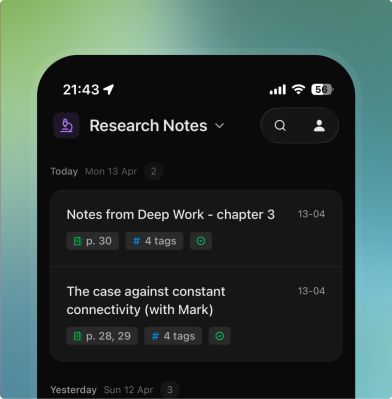
Every note is searchable in the Slownotes app. Once synced, it is searchable in Obsidian or Notion alongside everything else, and any note can be shared as context with ChatGPT or Claude.
03 - We leave the writing ritual untouched
Adoption by design treats daily use as a requirement from the first week. For Slownotes that means fitting into existing ways of working and avoiding frustration in using the app. This idea lives at the product's core: it changes nothing about what, how and where the user writes. They can still use the same pen and the same notebook. Slownotes takes away the tedious work, without touching the part that people love.
Writing and digitising are separate tasks at different moments for users, so we've disconnected them completely. If they want, someone can fill a notebook all week, and scan all their work on Friday afternoon. Scanning is a simple process using the built-in iOS document camera. After that the user can close the app: the workflow runs on our servers, a notification says when the note is ready. When syncing is enabled, it's sent to Obsidian, Notion or a webhook straight away.
The AI is invisible. There is no chat window or any explicit interaction with a model. The only input a user gives is the notes they write down with pen and paper.
Beta testers used Slownotes before the launch, and we changed the product based on their feedback. Slowdown became optional per note, so users decide when to apply it. The marker for a discovery changed, and the list of things Slownotes recognises as a discovery grew. Testers also asked for Notion next to Obsidian, so we added it before the launch.
What Slownotes delivers today
Slownotes has been live in the App Store since May 2026, for iPhone. All goals from the Discovery phase have been met.
-
High quality at a low price
One model reads the page, and a second corrects reading errors from context before the note is structured. If the first model fails, a fallback takes over. Testing models per step resulted in a curated set of small and large LLMs, each matched to its role. Simple work runs on cheap models, and we use more advanced models only when needed.
-
Effortless and asynchronous
A scan takes a few taps with the iOS document camera, up to five pages per note. Everything after that happens without user interaction.
-
Hypertext in handwritten notes
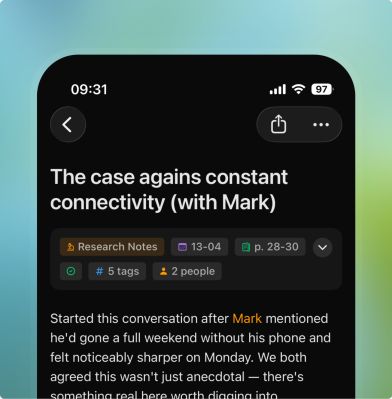
Writers can use Slowdown to mark titles, tags, people, tasks and discoveries in their handwritten notes. They can use this to structure notes, and create references between them.
-
Invisible AI
The app has no chat window and no conversation with a model. The AI stays under the hood.
-
Full ownership for the user
Notes are stored on the device, and scans are deleted from our servers within 24 hours of processingsource 3Slownotes privacy policyslownotes.app. New notes go to Obsidian as Markdown files with frontmatter and links, to Notion as pages, and to any webhook. Each note also exports as PDF, Markdown or plain text.

related expertise
The expertise behind this case
-
Intelligent document processing that classifies, extracts and validates invoices, contracts, claims and correspondence at scale, with people checking only what needs checking.
More on intelligent document processing -
Semantic search and retrieval-augmented generation (RAG) over your documents, archives, audio and structured data. Find what your organisation already knows in seconds.
More on knowledge retrieval and search
let's talk AI